Pennymoss Get it on the Store

Point of sale and customers, for small shops

A till that knows your customers.

Pennymoss runs on your Windows PC, keeps your data on your own computer, and works without the internet. Sell, track stock, reward your regulars and run offers. It is free for now.

Get it free from the Microsoft Store How to get your free key

For Windows 10 and 11. One free key per computer.

The Pennymoss home screen showing today's sales, purchases and a sales chart

Your data stays yours

Everything lives on your own computer. No account, no cloud, no storage fee. Pennymoss never sends your sales or customers anywhere.

Works when the internet doesn't

Sell, check stock and print receipts with no connection. Your shop keeps trading.

Made for the counter

Simple screens for the till, with separate cashier and admin sign-ins so staff only see what they should.

What you can do with it

Sell quickly

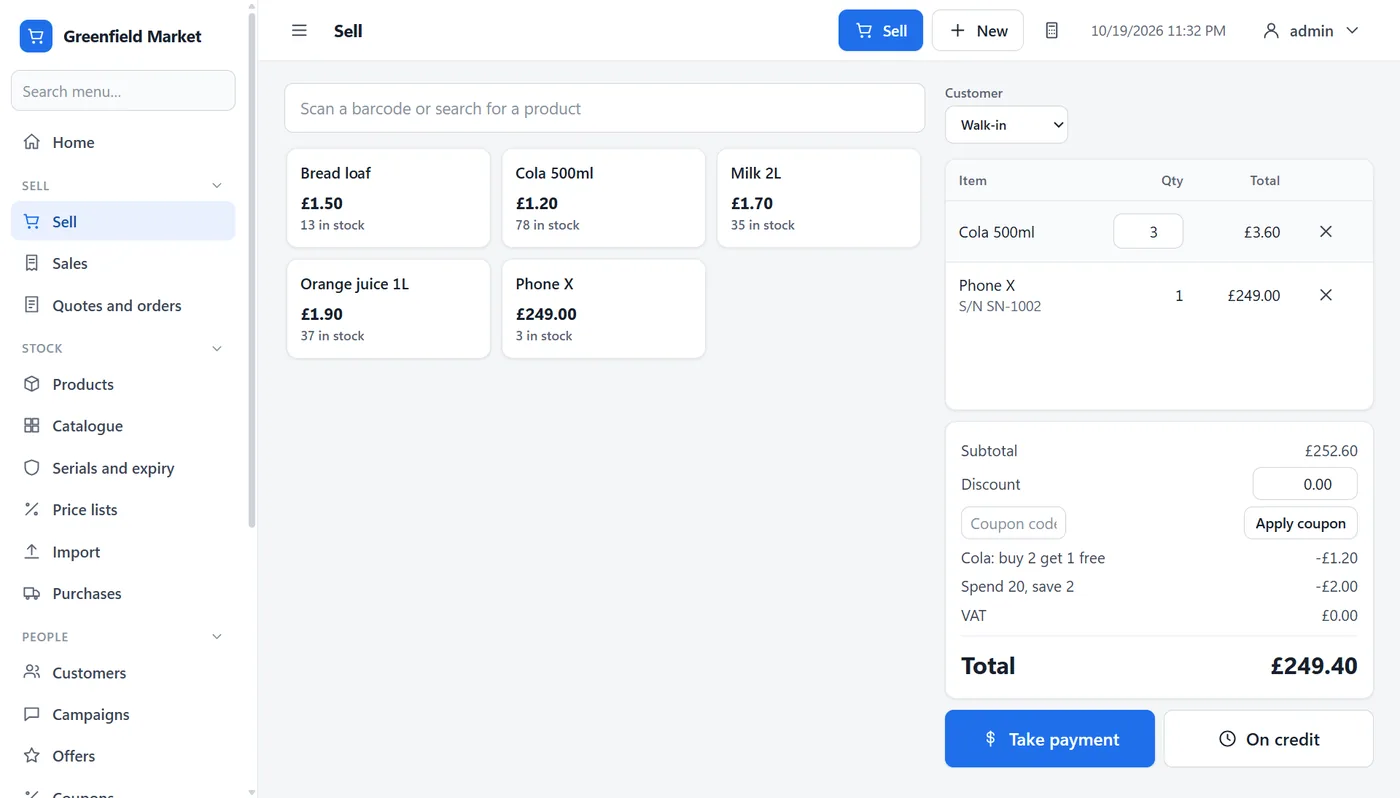
Scan a barcode or search, take cash, card or credit, and print or save the receipt. Choose any country and currency. Prices can include tax, as in the UK and EU, or have it added on top, as in the US. A tax summary report helps with your return.

The sell screen with a basket, an automatic offer and a serial-numbered phone

Offers that apply themselves

Set up "buy 2 get 1 free", a percentage off, "spend 20, save 2" or a Friday happy hour, and the till applies them for you. Give wholesale or trade customers their own price list.

The offers screen listing three automatic offers

Know your regulars

Every customer has a profile: what they bought, what they owe, notes, tags, birthdays and details you choose. A to-do list reminds you of follow-ups and customers who have not been in for a while. Reward them with points and tiers, store credit, gift cards and coupons.

A customer profile with spending, notes, tags and a privacy panel

Message them in your own words

Edit ready-made messages for receipts, offers and reminders. WhatsApp or your email program opens with the message ready, and you press send. Run a campaign to a group, including saved groups that keep themselves up to date, and see how many came back to buy.

The saved groups screen listing a group that updates itself

Stock that needs more than a number

Track serial numbers for phones and appliances and look up where one went, for a warranty or a recall. Receive batches with expiry dates for food and medicines: the earliest expiry sells first, and expired stock is never sold.

The expiry dates screen with batches, one expired and one expiring soon

Returns, reports and backups

Return one item from a sale and the refund, tax and points follow. Print any report or save it as a PDF. Pennymoss backs itself up every day to a folder you choose, such as a USB drive.

The return items dialog for part of a sale

And also

  • Quotes and orders with deposits
  • Loyalty tiers and points that expire
  • Staff commission and monthly targets
  • Suppliers, purchases and payments
  • Duplicate finder, customer import and export
  • Dark mode that follows Windows

Keep to the rules without the paperwork

Mark each customer as OK or not OK to message. When a customer asks, save a file of everything you hold about them, or erase them. Your past sales stay in your records without a name on them. Pennymoss has no analytics, no advertising and no tracking, and it does not connect to the internet by itself.

Read the privacy policy

Get Pennymoss free

Pennymoss is free for now. Each computer needs a free license key to unlock it, which takes a minute.

  1. Install it. Get Pennymoss from the Microsoft Store.
  2. Send us your computer code. Open Pennymoss. It shows a code and an "Email us this code" button. Press it and send the email. Or use the button below.
  3. Paste your key. We reply with your key. Paste it in and you are ready to sell.

Get it from the Microsoft Store Email us for a key

Questions

Is it really free?

Yes, for now. You get the whole program with every feature. If that ever changes, we will say so on this page first, and keys already issued will keep working.

Does it need the internet?

No. Selling, stock, reports and backups all work offline. Opening WhatsApp or your email program for a message uses your own connection, as it would anyway.

Where is my data?

On your computer, in a database file. We never see it. Pennymoss can back it up for you every day to a folder you choose. Choose a USB drive or a synced folder, because a copy on the same disk will not help if the disk fails.

Can I use it on more than one computer?

Each computer needs its own free key. Email us a code from each one.

Which printers and scanners work?

Pennymoss prints through the standard Windows print dialog, and barcode scanners that act like a keyboard, which most do, can scan into the search box. We have not yet tested cash drawers, thermal-printer drivers or card terminals, so please check before you rely on them.

What if my computer breaks?

Restore your latest backup on the new computer, then email us its new computer code and we will send a new key.

Which version of Windows?

Pennymoss is built for Windows 10 and 11. Most testing has been on Windows 11.

Who makes it?

Pennymoss is made by Jim Ross at cybertrickz.info.

Try it in your shop this week.

Get it free from the Microsoft Store